Reverse ETL vs iPaaS and Workflow Automation: Which Tool Should Own the Workflow?
- Jason B. Hart
- Data Activation
- May 23, 2026
- Updated June 9, 2026
Table of Contents
Reverse ETL vs iPaaS and workflow automation: the operating decision
The question is not whether reverse ETL, Workato, Zapier, Tray, Salesforce Flow, or HubSpot workflows can move data. Most of them can. The question is which layer should own the logic once a real revenue workflow depends on it.
This gets messy in mid-size SaaS companies because every team already has an automation surface. Data has dbt models and reverse ETL. RevOps has CRM workflows. Marketing has lifecycle tools. Sales has routing rules. Product has events. Customer success has health scores. Finance has the number everyone has to defend later.
When the workflow breaks, nobody wants to own the mess. The data team says the model was right. RevOps says the sync mapped the wrong field. Marketing says the audience was stale. Sales says the territory rule changed. The tool category was never the real problem. The missing operating contract was.
Use this guide to decide whether a workflow belongs in reverse ETL, iPaaS/workflow automation, native CRM automation, custom code, or a pause to fix definitions first.
Use this alongside the Data Activation Playbook when the real decision is how trusted warehouse logic should reach CRM, lifecycle, sales, customer-success, or AI workflows safely.
Quick answer: which layer should own the workflow?
| Option | Best use | Watch-out | Better next move when it is not ready |
|---|---|---|---|
| Reverse ETL / data activation | Move trusted warehouse fields, audiences, scores, or eligibility flags into CRM, lifecycle, sales, CS, or product systems | Treating every sync as harmless plumbing when it changes real customer or revenue work | Define owner, mapping, QA, rollback, and downstream action before expanding syncs |
| iPaaS / workflow automation: Workato, Tray, Zapier | Orchestrate multi-step actions, approvals, alerts, enrichment calls, and cross-tool handoffs | Recreating business definitions inside recipes and zaps because the source logic is not settled | Keep orchestration in the automation layer, but govern the decision logic upstream |
| Native CRM automation: Salesforce Flow, HubSpot workflows | Handle CRM-local routing, updates, notifications, lifecycle steps, and sales/marketing operations that live inside the destination | Turning the CRM into a shadow data warehouse with duplicate lifecycle, territory, score, or suppression rules | Use it for local actions, not source-of-truth logic that should be shared across systems |
| Custom scripts / APIs | Support high-control, product-embedded, regulated, or unusual workflows where generic tools cannot handle the job | Invisible infrastructure with one unofficial owner, weak monitoring, and no business-facing contract | Use custom only when the maintenance burden is worth the control |
| Pause and fix definitions first | Source precedence, ownership, field meaning, lifecycle rules, or trust thresholds are still unresolved | Buying a tool that makes disagreement move faster | Start with Data Foundation or Translate the Ask before activation |
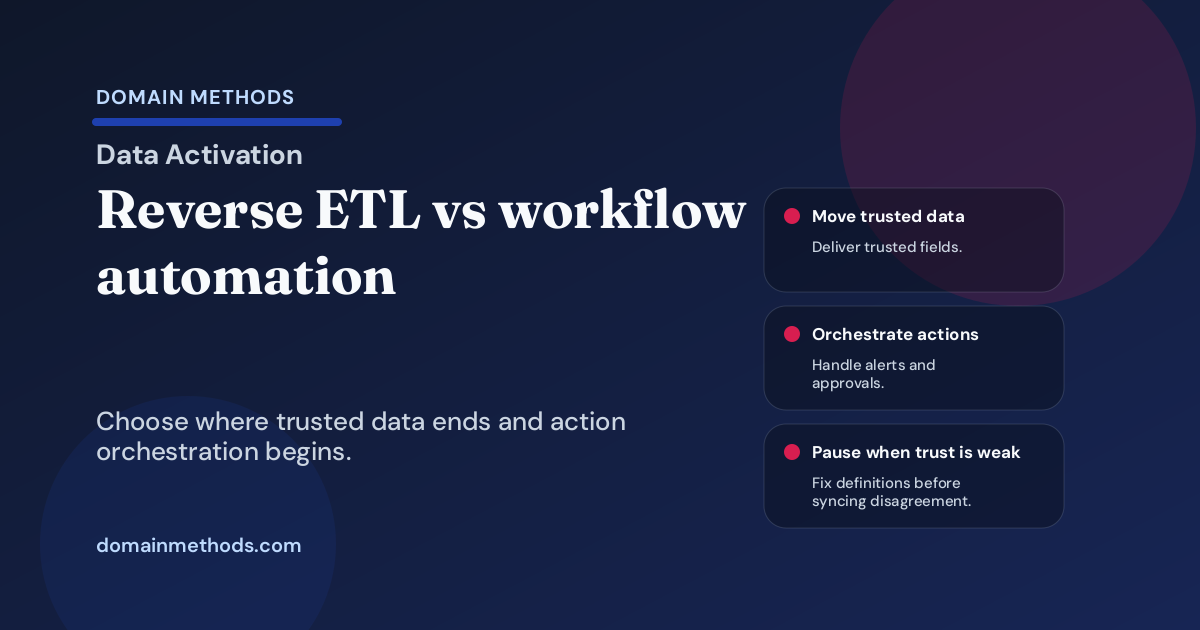
The strongest teams separate two jobs that often get blurred: moving trusted data and orchestrating actions.
Moving trusted data is not the same as orchestrating actions
Reverse ETL is strongest when the warehouse already contains logic the business trusts. The PQL score, account segment, renewal-risk flag, lifecycle stage, usage threshold, or suppression rule gets modeled upstream and pushed into the tools where people work.
Workflow automation is strongest when the data has arrived and the business needs a sequence of actions: notify the account owner, enrich a record, create a task, wait for approval, branch on a status, open a ticket, or send a Slack alert.
Those are different ownership problems.
If the warehouse is the source of truth for the score, do not rebuild the score in Salesforce Flow because it feels faster. If the CRM owns the sales action, do not force the warehouse sync to impersonate a sales process. If Workato or Tray is coordinating five systems, do not let the recipe become the only place anyone can find the business rule.
The same operating split shows up when a team writes the activation data contract before trusted fields hit CRM.
The practical split is simple:
| Question | Usually belongs closer to data activation | Usually belongs closer to workflow automation |
|---|---|---|
| What is the trusted value? | Warehouse model, governed source, tested transform | Reads the value and branches on it |
| Where should the field or audience land? | Reverse ETL destination mapping | May consume the landed value |
| What action happens next? | Named in the operating contract | Orchestrated in iPaaS, CRM, or destination tool |
| Who owns exceptions? | Data + RevOps define bad data and sync failure handling | Workflow owner handles skipped steps, alerts, approvals, retries |
| What changes often? | Definitions should change deliberately | Action sequences may need business-user iteration |
A lot of teams buy the wrong tool because they skip this split.
Six criteria before picking the tool category
1. Where does the trusted logic live?
If the logic lives in dbt or another governed warehouse model, reverse ETL is usually the cleaner delivery pattern. If the rule only exists inside Salesforce, HubSpot, or a lifecycle platform, native automation may be enough. If the rule exists nowhere except in a meeting note, you are not ready to automate it. For field-level ownership questions, the CRM field ownership checklist is the narrower companion to this broader tool-category decision.
The risky middle is common: a team has a warehouse model, a CRM formula, a Zapier step, and a spreadsheet all trying to define the same thing. In that case, the next move is not picking a winner from a vendor shortlist. The next move is deciding which definition gets to be true.
2. Who owns failures?
Every workflow has failure modes: stale source data, null fields, bad identity matches, destination API limits, duplicate records, suppressed contacts, broken routing, skipped approvals, and sales reps ignoring a field they do not trust.
If nobody owns those failures, the tool will become a blame machine. Reverse ETL needs an owner for model quality and sync health. iPaaS needs an owner for orchestration paths and exception handling. CRM automation needs an owner for local rules and field governance. Custom code needs an owner who can support it when the original builder is on vacation.
3. Can the destination absorb the workflow safely?
Destination limits matter more than demos admit. Salesforce, HubSpot, Braze, Slack, and CS platforms all have API limits, field constraints, permission models, workflow timing quirks, and auditability differences.
A PQL score synced once a day is not the same as a near-real-time routing trigger. A Slack alert is not the same as a CRM field used for manager inspection. A suppression flag is not the same as a customer-facing lifecycle branch. The more the workflow changes customer or revenue action, the more you need QA, monitoring, and a rollback path.
4. Does the workflow need human review?
Some workflows should suggest, assist, or route before they act. A churn-risk score might open a review queue before it changes a customer status. A lead score might prioritize an SDR view before it auto-reassigns ownership. A lifecycle suppression rule might require a weekly exception report before it blocks a campaign segment.
When human review is part of the workflow, iPaaS or native CRM automation may be the action layer, while reverse ETL simply delivers the trusted signal. That is healthy. It becomes unhealthy when the automation layer quietly becomes the place where the signal is defined.
5. Do business users need safe self-serve changes?
If business users need to change steps, notifications, owners, or approvals often, Workato, Tray, Zapier, Salesforce Flow, or HubSpot workflows can be useful. But self-serve action changes are not the same as self-serve definition changes.
A lifecycle ops team may safely adjust who gets notified. It should not casually rewrite the definition of an expansion-qualified account if finance, sales, CS, and data depend on that same field elsewhere.
6. Is the workflow real enough to start small?
The best first workflow is specific enough to test in one destination with one owner. If the team says, “we want all customer data activated everywhere,” slow down. Start with one workflow that has a clear business consequence.
That might be a product-qualified account score in Salesforce, lifecycle suppression in HubSpot or Braze, churn-risk escalation to CS, account-match routing for sales, or a Slack alert tied to a narrow operating threshold.
SaaS examples: where the line usually sits
Sync a product-qualified account score to Salesforce
If the score is modeled and tested in the warehouse, reverse ETL should usually deliver it into Salesforce. Salesforce Flow may handle the local action: create a task, update a view, notify an owner, or route for review.
The mistake is rebuilding the score inside Flow because someone wants the workflow live by Friday. That feels fast until product usage, firmographic fit, lifecycle stage, and account hierarchy drift across systems.
Create a Slack alert when churn risk crosses a threshold
Reverse ETL or a warehouse job can expose the risk flag. Workato, Tray, Zapier, or a native CS-platform workflow may orchestrate the alert, escalation, and follow-up task.
The ownership question is not “can Slack get the message?” It is whether the risk flag is trusted, who reviews false positives, and what customer-facing action is allowed before a human checks context.
Add lifecycle suppression to HubSpot or Braze
If suppression depends on billing, lifecycle, product usage, support status, and consent data, the definition should usually live upstream. Reverse ETL can sync the suppression field or audience. HubSpot or Braze can apply it to campaigns. Before those audiences go live, use a suppression logic checklist to name which records, customers, or workflows should stay out of the sync.
The bad pattern is letting every lifecycle marketer create a separate suppression branch because the shared field is missing. That creates a maze of campaign-specific truth.
Route leads based on account match and territory rules
If territory, account ownership, partner rules, and account matching are CRM-owned and stable, Salesforce Flow may be enough. If account matching depends on warehouse identity logic or product/account signals, a reverse ETL or data-activation layer may need to supply the trusted fields.
If nobody agrees on account ownership or territory precedence, neither tool category fixes the problem. You need a definition record before automation.
Common bad patterns to avoid
Rebuilding dbt logic inside Salesforce Flow
Salesforce Flow is useful. It is not a replacement for governed transformation logic when the same rule needs to be trusted by sales, marketing, CS, finance, and product.
A Flow rule that starts as a quick patch often becomes the hidden source of truth. Six months later, the warehouse says one thing, Salesforce says another, and the weekly revenue meeting turns into archaeology.
Using Zapier to patch source-of-truth disagreement
Zapier can be great for lightweight handoffs. It is a bad place to settle disputed definitions.
If the team cannot agree whether a customer is active, whether an account is qualified, or which source wins when fields conflict, adding a zap only moves confusion faster. It also makes the workaround feel real because tasks start firing.
Letting every function create its own automation branch
Marketing builds one workflow. RevOps builds another. CS builds another. Product builds another. Each branch is reasonable in isolation. Together they create a customer journey nobody can explain.
The fix is not centralizing every click. The fix is a shared workflow contract: source, owner, destination, action, exception path, review cadence, and rollback.
Buying reverse ETL when the workflow is still undefined
Reverse ETL is valuable when the team knows what deserves to move downstream. It is expensive busywork when the team only knows it wants “more data in tools.”
If the first workflow cannot be named in one sentence, start with Translate the Ask before buying another activation layer.
Workflow ownership decision tree
The visual below is the operator version of the decision. It starts with trust and ownership because those are the two parts most tool evaluations skip.
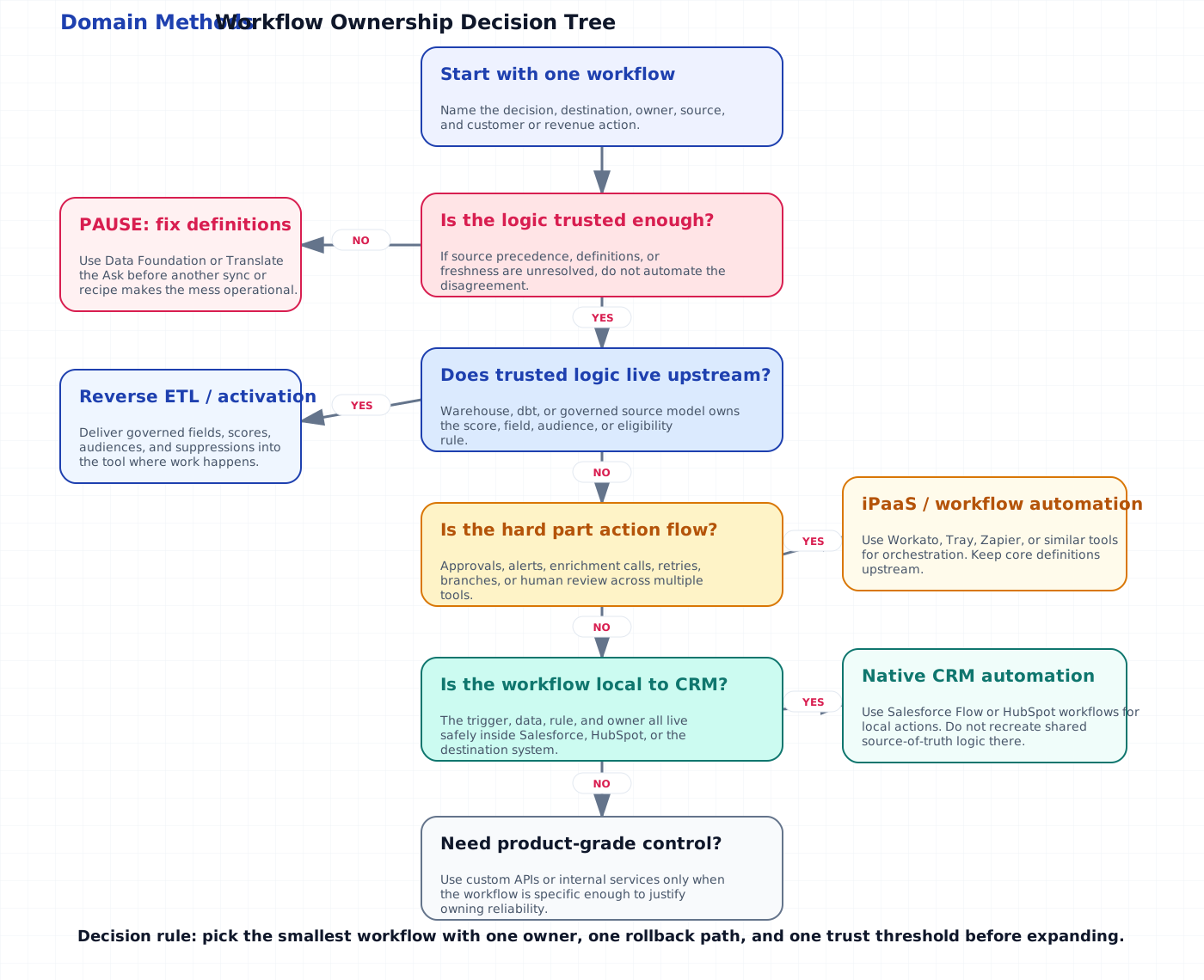
Use the same logic in a working session:
- Is the decision logic trusted enough to expose downstream?
- Does the trusted logic live in the warehouse or a governed model?
- Is the hard part moving fields/audiences, or orchestrating actions?
- Does the destination system already own the workflow safely?
- Is the workflow too specific or embedded for standard tools?
- Who owns the first failure after launch?
If the answer to the last question is “we will figure that out later,” the workflow is not ready.
Download the Workflow Ownership Decision Tree (PDF)
Use this worksheet to decide whether your next revenue workflow belongs in reverse ETL, iPaaS, native CRM automation, custom APIs, or definition cleanup before another tool gets added.
Instant download. No email required.
Want future posts like this in your inbox?
This form signs you up for the newsletter. It does not unlock the download above.
Final recommendation: start with one workflow and one owner
Do not start this decision with a platform category. Start with one workflow the business actually needs to operate.
Write it in a sentence:
When [condition] happens, [owner] needs [action] in [destination], using [trusted source], with [review or rollback path] if it is wrong.
If that sentence is easy to write, the tool choice gets clearer. Reverse ETL delivers the trusted signal. Workato, Tray, Zapier, Salesforce Flow, HubSpot workflows, or custom code may orchestrate the action. Data Activation helps when the workflow is ready to operationalize. Translate the Ask helps when the ask still needs to become a usable operating contract. Data Foundation comes first when the definitions are too brittle to trust.
If the sentence is hard to write, do not hide that behind a vendor comparison. The practical move is to slow down, pick the first workflow, name the owner, and decide what has to be true before the business is allowed to automate it.
Download the Workflow Ownership Decision Tree (PDF)
A lightweight worksheet for deciding whether a SaaS workflow belongs in reverse ETL, iPaaS, native CRM automation, custom APIs, or foundation cleanup.
DownloadReady to operationalize the workflow?
Data Activation
Use Data Activation when the workflow is clear and the team needs trusted warehouse, CRM, product, or customer data moved into the systems where revenue teams act.
See Data ActivationStill arguing about the ask?
Translate the Ask
Use Translate the Ask when the category debate is masking an unclear decision, owner, workflow, or operating contract.
Translate the workflow askSee It in Action
Common questions about reverse ETL and workflow automation
Is reverse ETL the same as workflow automation?
When should a SaaS team use iPaaS instead of reverse ETL?
When is Salesforce Flow or HubSpot workflow automation enough?
What should we do if nobody trusts the data yet?

About the author
Jason B. Hart
Founder & Principal Consultant
Helps mid-size SaaS companies turn messy marketing and revenue data into decisions leaders trust.